Mobile & Driver App
Driver App - Getting Started
How to enable the driver app, register drivers, publish schedules, and have drivers enter their trips.
Step 1. Enable the driver app
Contact HaldiTech support (support@halditech.com) and have them enable the driver app on your account.
Step 2. Check driver contact info
Go to Drivers in the left menu. Make sure each driver has an email address and phone number on their record — those are needed to register them for the app.
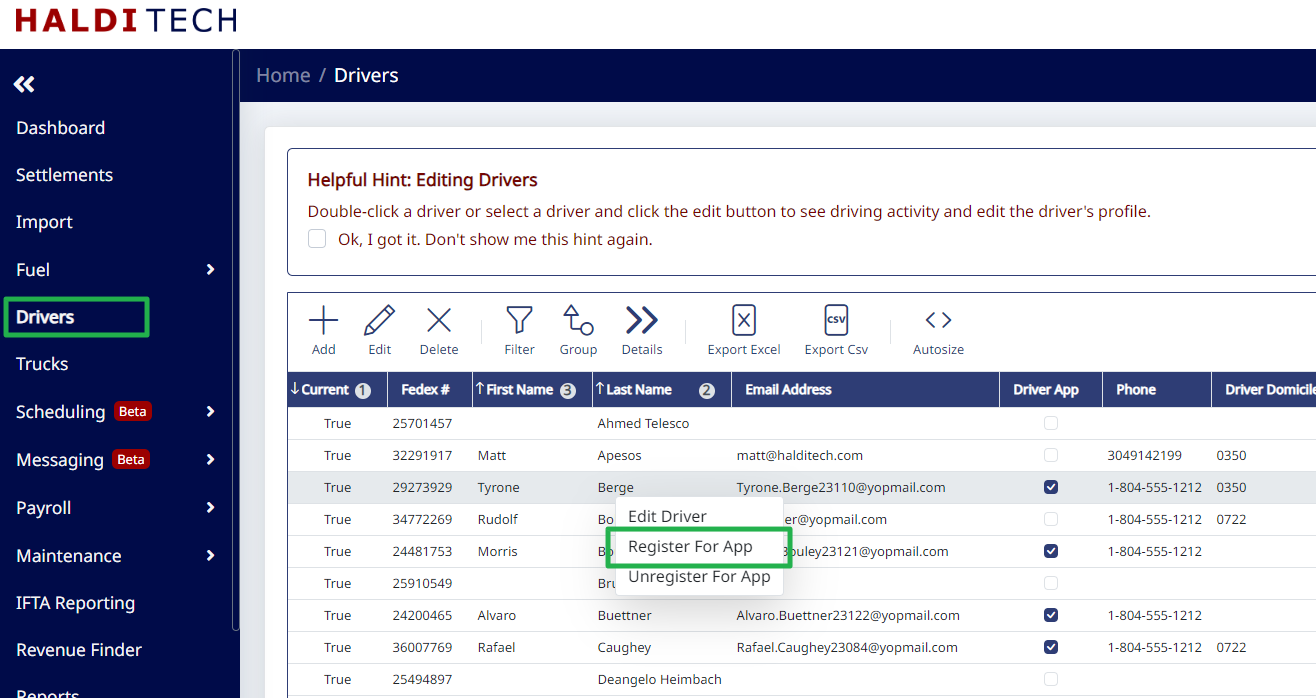
Step 3. Register each driver for the app
Right-click a driver and choose Register For App. The driver receives an email with instructions to set up their account. (To revoke access later, right-click and choose Unregister For App.)
Once registered, drivers can log in to the mobile app to see their dispatch, request time off, and message dispatch.
Need help?
Email support@halditech.com or call us at (470) 594-2534.